Every account, one view
Cash, bank, e-wallet, credit card. Transfers land on both sides. Multi-currency ready.
Track income and expenses, plan budgets, monitor cash flow, attach receipt photos, and create business invoices from one app.
No credit card required · Download or delete your data anytime
Total balance
Rp 18.475.000
+ Rp 2,300,000 this month
May expenses
Rp 4.620.000
79% of budget
Recent transactions
May 2026May salary
BCA
+ Rp 8.000.000
Office rent
Cash
− Rp 2.500.000
Internet bill
BCA
− Rp 480.000
Manage transactions, budgets, reports, and invoices without having to learn complex accounting software.
Cash, bank, e-wallet, credit card. Transfers land on both sides. Multi-currency ready.
Snap a receipt on your phone and it sticks to the transaction.
Income/expense categories, a budget per month, then watch the spend.
Draft, send, take instalments. Tax per line to e-Faktur's rule; status turns ‘paid’ on its own.
Set a monthly client up once — the schedule runs and sends itself.
Your logo, signature and stamp on every invoice.
Cash flow follows the range: daily, weekly or monthly. Kept apart per currency.
A spreadsheet in your own Google Drive that updates itself whenever your books change — open it, filter it, analyse it.
Your financial data is held behind Postgres Row-Level Security in the database, not just in app code.
Choose a guide for managing personal money or running a small business.
Keep day-to-day transactions, budgets, cash flow, and invoices in one place.
Explore the Budgetku finance appTrack income, expenses, and monthly budgets without a complicated spreadsheet.
Explore personal financeRecord business transactions, review cash flow, and prepare reports for your business.
Explore small business financeCreate, send, and monitor invoice payments from the same app.
Explore small business invoicesAttach a receipt photo or PDF to a transaction on the web. In the Android app being prepared for Google Play, receipt scanning also reads the amount and date.
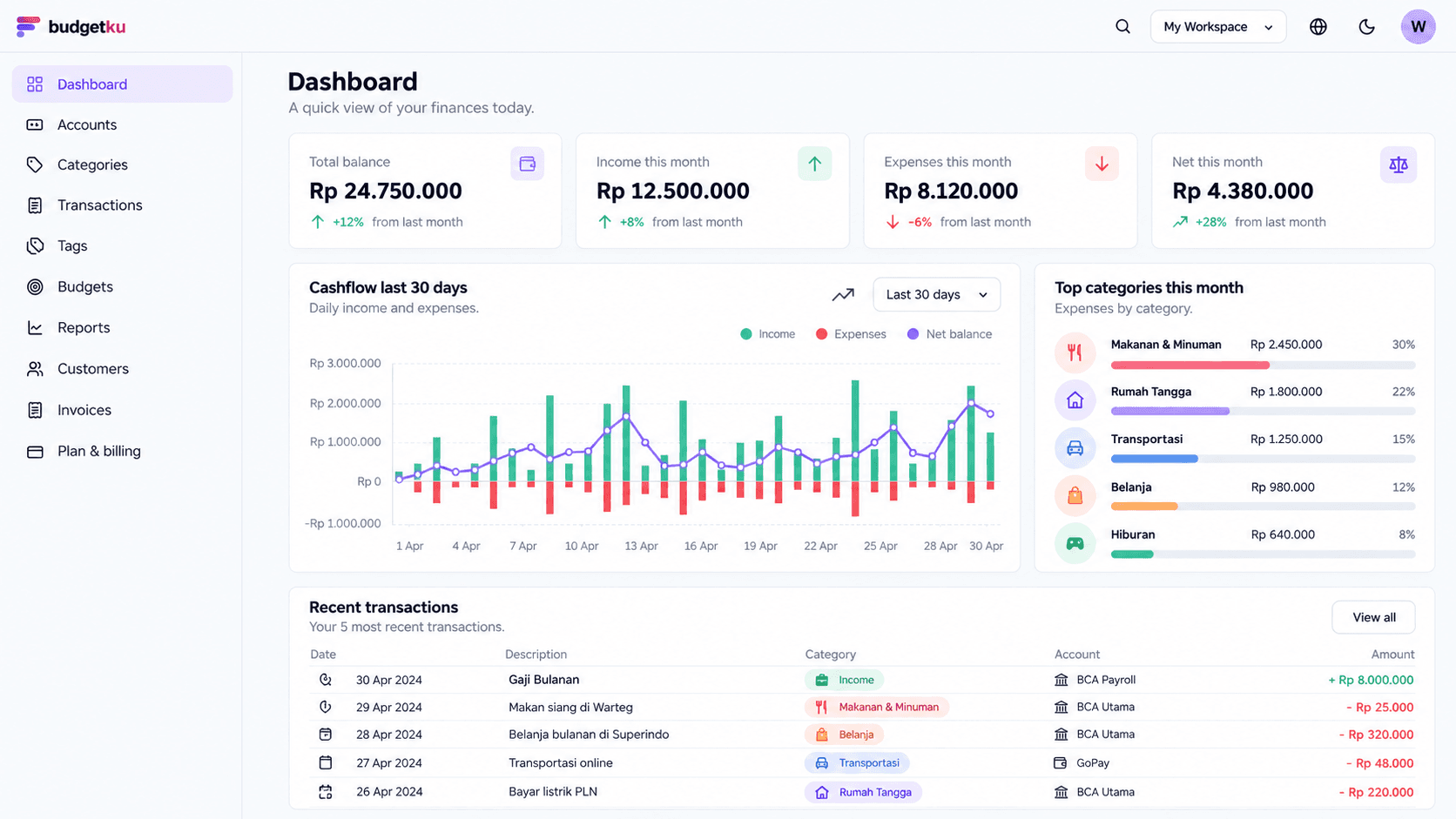
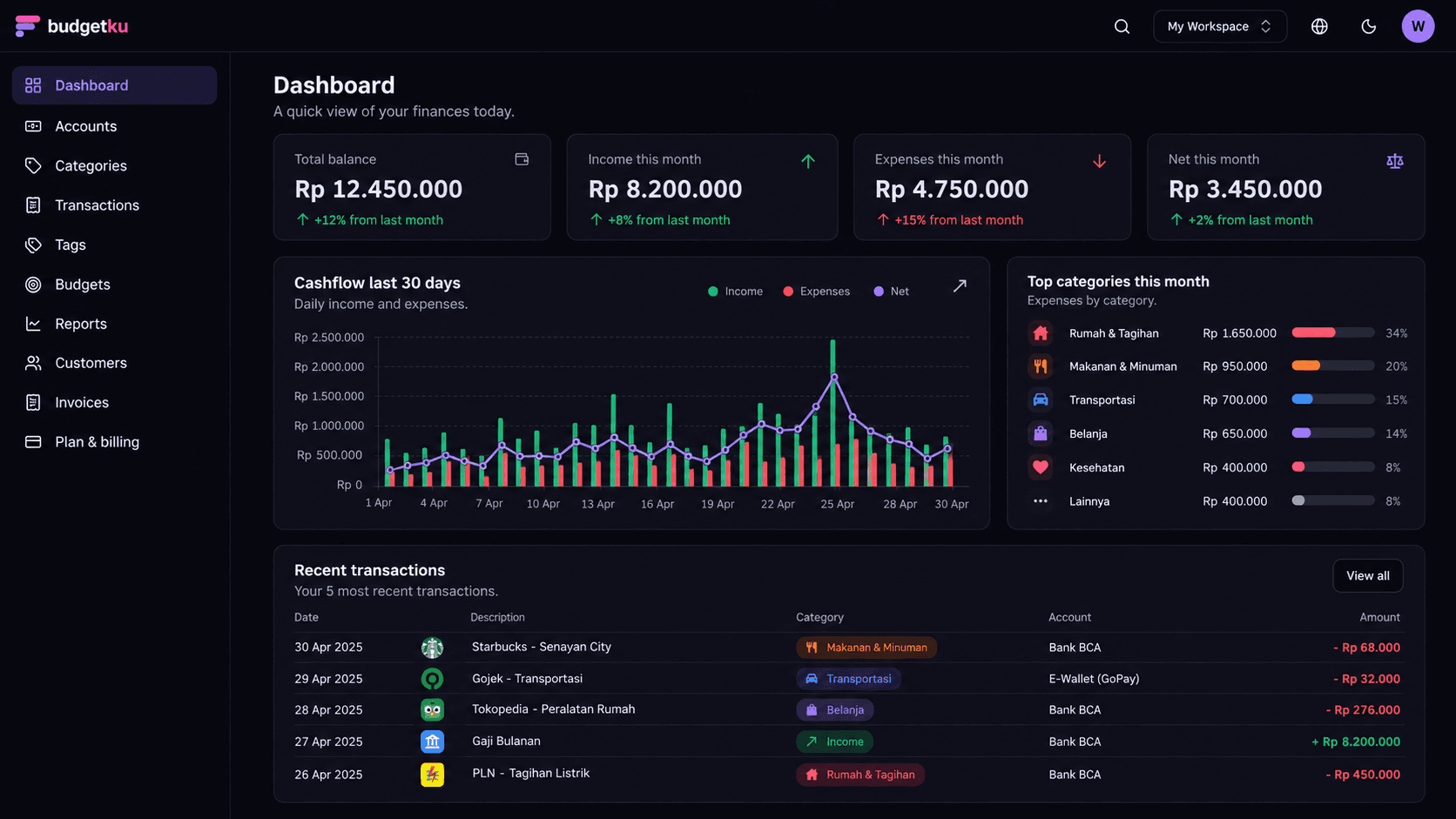
Explore receipt scanningBalance, 30-day cashflow, top spending categories and recent transactions — right there when you sign in.
No long onboarding. Open, sign up, and use it.
Email + password. Your first workspace is created automatically.
Record where your money lives (cash, bank, e-wallet) and group income / expense.
Every entry shows up immediately on the dashboard, budgets, and cashflow reports.
Every price is in Rupiah and final. Free stays free; Pro and Business are paid upfront.
For individuals and small SMBs starting to track finances.
Rp0forever
Try the AI assistant free
Log transactions by chat or ask for category suggestions.
Invoices on the Free plan carry a Budgetku watermark.
Small teams and collaborative needs.
Rp59,000/month
AI assistant for everyday logging
Log transactions just by chatting, plus financial insights on your dashboard.
Everything in Free, plus:
SMBs that need invoices + VAT.
Rp159,000/month
AI assistant with a bigger allowance
Room for the whole team, plus financial insights on your dashboard.
Everything in Pro, plus:
Common questions from prospective users.
The Free plan is free forever for basic personal use — no card required, no time limit. Pro (Rp 59,000 per month) and Business (Rp 159,000 per month) are paid plans, billed monthly, and can be cancelled any time.
Each workspace is isolated at the database level via Postgres Row-Level Security — not just at the application layer. Even if a service has a bug, your data physically can't be accessed from another workspace.
No. Budgetku is a bookkeeping and budgeting app (software) — we only help you record and analyze your own finances. Budgetku is not an e-wallet, payment gateway, lending service, or investment product, and never holds or moves your funds. Payments are used only to charge your Budgetku subscription.
Yes. CSV export for transactions, cashflow, profit & loss, and category breakdowns is available from the Pro plan up. Every plan including Free can download a full copy of its account data from the profile menu (top right) → Account. Your data is yours — no vendor lock-in. Pro also syncs automatically to Google Sheets.
Yes. The sheet lives in your own Google Drive — Budgetku can only access files it created, never anything else in your Drive. It updates automatically whenever your data changes (usually within about 15 minutes), or right away with "Sync now". Available from the Pro plan; Business adds Invoices, Customers, and Profit & Loss tabs. You can disconnect any time — the sheet stays yours.
Yes. Under Transactions → Scheduled, set up recurring bills or income — weekly, monthly, quarterly, or yearly. Choose Automatic for salary, installments, or subscriptions with a fixed amount: the transaction records itself on its date. For bills whose amount changes, like electricity, choose Reminder: you get a 07:00 WIB digest email (on the day, or 1, 3, or 7 days before) and can record it in one click from the dashboard. Free includes 3 schedules; Pro and Business are unlimited.
Yes — from the Pro plan up, you can create more than one workspace and switch quickly from the header. Useful if you keep personal and small-business finances, or run several business units. The Free plan includes 1 workspace, and each workspace has its own plan.
The Budgetku Android app is being prepared for Google Play and isn't publicly available to download yet. In the meantime, the Budgetku web app is fully responsive and works well in your phone's browser. There is no iOS app yet.
Yes. For invoices, each line is computed per the Indonesian e-Faktur convention (round per line, then sum — not sum-then-tax). The default rate is 11% and can be overridden per item.
Sign up in 30 seconds. No credit card. Leave the spreadsheet behind today.
Get started